by
by Ayushman Card Online: Registration & Download Guide (2026)
Ayushman Card Online is the easiest way for eligible citizens in India to access the benefits of the Ayushman Bharat Pradhan Mantri Jan Arogya Yojana (PM-JAY). Through the official online portal, beneficiaries can register, complete eKYC, check eligibility, track application status, and download their Ayushman Card without visiting government offices.
This complete 2026 guide explains the entire Ayushman Card Online registration process, required documents, eligibility criteria, status check, and card download step by step.The Ayushman Card is an essential health identification card issued under the Ayushman Bharat Pradhan Mantri Jan Arogya Yojana (PM-JAY).
It enables eligible beneficiaries to access cashless healthcare services at empanelled hospitals across India.With online registration and digital services, applying for an Ayushman Card has become easier than ever. Whether you want to register, check your eligibility, download your card, or track your application, this comprehensive 2026 guide covers everything you need to know.
Table of Contents
What is an Ayushman Card?
An Ayushman Card is a digital health card that identifies beneficiaries under the Ayushman Bharat PM-JAY scheme. It allows eligible families to receive cashless medical treatment at government and empanelled private hospitals.
The card contains the beneficiary’s details and can be downloaded online for future use.
Benefits of an Ayushman Card
The Ayushman Card offers several benefits, including:
- Cashless treatment at empanelled hospitals
- Health insurance coverage of up to ₹5 lakh per family per year
- Coverage for secondary and tertiary hospitalization
- No restriction on family size or age
- Access to hospitals across India
- Paperless and cashless treatment process
- Digital verification of beneficiary details
- Easy online card download
Who is Eligible?
Eligibility is determined based on the SECC (Socio-Economic Caste Census) data and other government criteria.
Generally, eligible beneficiaries include:
- Economically weaker families
- Rural households meeting PM-JAY criteria
- Urban workers in eligible occupations
- Existing PM-JAY beneficiaries
- Families listed in government beneficiary databases
You can check your eligibility online before applying.
Documents Required
Keep the following documents ready:
- Aadhaar Card
- Mobile Number linked with Aadhaar
- Ration Card (if applicable)
- Family ID (where applicable)
- Passport-size Photograph
- Address Proof
- Identity Proof
Some states may request additional documents during verification.
How to Register for an Ayushman Card Online
Follow these simple steps:
Step 1: Visit the Official Portal
Open the official Ayushman Bharat beneficiary portal.
Step 2: Verify Mobile Number
Enter your registered mobile number and complete OTP verification.
Step 3: Check Eligibility
Search using one of the following:
- Aadhaar Number
- Family ID
- PM-JAY ID
- Mobile Number
- Ration Card (where supported)
Step 4: Complete e-KYC
Verify your identity using Aadhaar-based e-KYC.
Step 5: Upload Documents
Upload the required documents if requested.
Step 6: Submit the Application
Review all details carefully and submit your application.
How to Check Ayushman Card Status
To track your application:
- Visit the official portal.
- Log in using your registered mobile number.
- Enter the required details.
- Click Check Status.
Possible application status includes:
- Submitted
- Under Verification
- Approved
- Rejected
- Card Generated
How to Download Ayushman Card Online
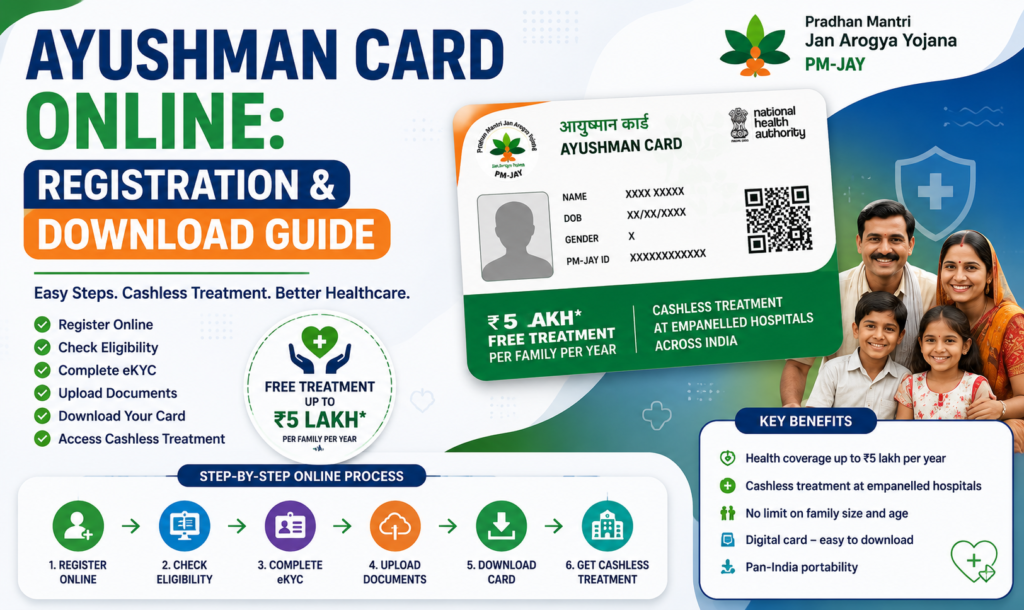
Once approved, you can download your Ayushman Card by following these steps:
- Visit the official beneficiary portal.
- Log in using OTP verification.
- Select the approved beneficiary.
- Click Download Ayushman Card.
- Save the PDF for future use.
You may also print a physical copy if required.
Processing Time
Most applications are processed within:
2–7 working days
Processing time may vary depending on verification requirements.
Common Reasons for Rejection
Applications may be rejected due to:
- Aadhaar mismatch
- Incorrect personal details
- Failed e-KYC verification
- Duplicate records
- Ineligible beneficiary
- Incomplete application
- Invalid supporting documents
Tips for Faster Approval
For a smooth registration process:
- Keep Aadhaar linked with your mobile number.
- Enter accurate personal details.
- Upload clear documents.
- Complete e-KYC carefully.
- Regularly check your application status.
- Apply only through official government portals.
Is Ayushman Card registration free?
Yes. Registration and card download are completely free through the official government portal.
Can I download my Ayushman Card online?
Yes. After approval, beneficiaries can download the Ayushman Card in PDF format.
How much health coverage does PM-JAY provide?
Eligible families receive up to ₹5 lakh per family per year for cashless hospitalization.
Is Aadhaar mandatory?
Aadhaar is generally required for identity verification and e-KYC.
Can I use the card anywhere in India?
Yes. The Ayushman Card is accepted at empanelled hospitals across India under the PM-JAY scheme.
Final Thoughts
The Ayushman Card Online service has made it simple for eligible citizens to access healthcare benefits without unnecessary paperwork. By checking your eligibility, completing Aadhaar verification, and downloading your digital card, you can quickly access cashless treatment at empanelled hospitals.
Always use the official government portal for registration, status checking, and downloading your Ayushman Card to ensure a safe and secure application process.