Summary Box: WhatsApp DP Crop makes it easier to fit portrait, landscape, and full-body photos into your WhatsApp profile picture. Learn simple ways to position your photo correctly and avoid cutting off important parts.
What Is WhatsApp DP Crop?
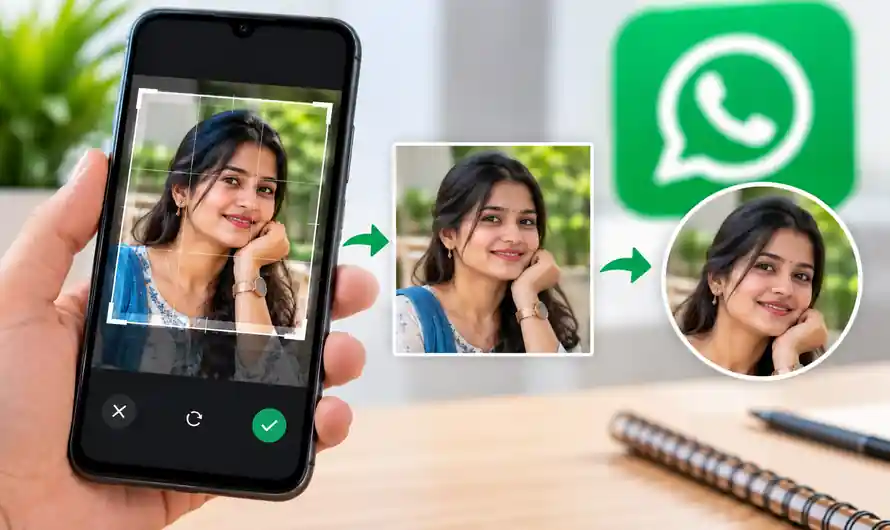
WhatsApp DP Crop means adjusting a photo so it fits properly when used as a WhatsApp profile picture. This is especially useful when a photo is too tall, too wide, or has the person positioned close to the edge. WhatsApp allows users to add or change their profile photo directly from the profile settings.
The main challenge is keeping the important part of the photo visible after cropping. A close-up portrait usually needs less adjustment, while a full-body or group photo may need more space around the subjects. Preparing the image before uploading can give you much better control over the final appearance.
WhatsApp DP Crop: 7 Easy Tips to Get the Best Result
1. Choose a Clear Original Photo
Start with the highest-quality version of your picture. A sharp original gives you more freedom to crop and reposition the image without making the final profile photo look unnecessarily blurry.
2. Keep the Main Subject in the Centre
Table of Contents
Place your face or main subject close to the centre of the frame. This is particularly helpful for portraits because important areas near the outer edges are more likely to be lost when the profile image is displayed.
3. Leave Enough Space Around Your Face
Avoid using a photo where your head touches the top edge or your shoulders are already outside the frame. A little extra background around the subject makes repositioning easier and gives the finished DP a more balanced appearance.
4. Use a Square Crop When Needed
If your original photo is vertical or horizontal, first create a square version using your phone’s photo editor. A square composition makes it easier to decide which areas should remain visible before you upload the picture to WhatsApp.
5. Check the Crop Preview Carefully
After selecting the image, look closely at the preview before saving it. Move the picture until your face, hair, shoulders, or other important details are positioned correctly. WhatsApp provides crop and rotation controls for editing images.
6. Avoid Over-Editing
A profile picture does not need excessive filters, text, stickers, or effects. Keep the subject clear and recognizable, especially if the image is being used as a personal profile photo rather than a promotional graphic.
7. Check Privacy Before Sharing
Your profile picture may be visible to other WhatsApp users depending on your privacy settings. WhatsApp provides options including Everyone, My contacts, My contacts except…, and Nobody, allowing you to control who can see it.
How to Change Your WhatsApp Profile Picture
Changing the profile photo is straightforward. Open WhatsApp and go to your profile settings, select your current profile picture, then choose the option to upload a photo from your device. Adjust the image as needed and save the new picture. WhatsApp’s official help centre confirms that profile photos can be added, changed, or removed from profile settings.
If you are preparing the picture outside WhatsApp, crop it first and check that the important subject is comfortably inside the frame. This is especially useful for family photos, full-body pictures, and images containing multiple people.
Why Does WhatsApp Crop My Photo?
The photo may be cropped because your original image has a different shape from the profile-photo frame. A vertical photograph contains more height, while a horizontal photograph contains more width, so some areas may not remain visible after adjustment. The easiest solution is to reposition the image or prepare a better-framed square version before uploading.
Frequently Asked Questions
What is WhatsApp DP Crop?
It is the process of adjusting a photo so it fits properly as a WhatsApp profile picture without losing important areas.
Can I crop my photo directly in WhatsApp?
Yes. WhatsApp provides photo editing controls that allow you to crop and rotate images.
How can I show my full-body photo?
Reduce the subject’s size and leave more space around the person before uploading. A wider original photo can also make this easier.
Can I control who sees my WhatsApp DP?
Yes. WhatsApp provides profile-photo privacy options that let you decide who can see your picture.
Conclusion
A good WhatsApp DP Crop starts with a clear photo, enough space around the subject, and careful positioning. Prepare the image before uploading, check the preview, and review your privacy settings to create a clean profile picture that looks good while keeping control over who can see it.
Internal Link Suggestion:
Book Flight Tickets at the Lowest Price in 2026
Official External Link(s):
WhatsApp Help Center – Edit Your Profile
WhatsApp Help Center – Edit Photos and Videos
WhatsApp Help Center – Profile Photo Privacy